
Use this checklist to track the Partner’s progress or to plan ahead
Gateway Integration Overview
This integration allows the Pay1st Partner to use the Pay1st Gateway in Pay1st Partner’s Platform.
The steps in this integration style involve:
- Configuring the Partner Profile and API Credentials
- Configuring and implementing Webhooks and Callbacks
- Implementing the Generate Access Token API for authentication with the Pay1st Gateway
- List Payment Methods that Customers will choose from
- Implementing the Create Payment Request API
- Redirecting to the Pay1st Gateway by Building Pay1st Payment Links
- Receiving the Payment Complete Webhook Request to process concluded payments
- Notifying the Pay1st Gateway on completed fulfilments via Fulfilment Completion Webhooks
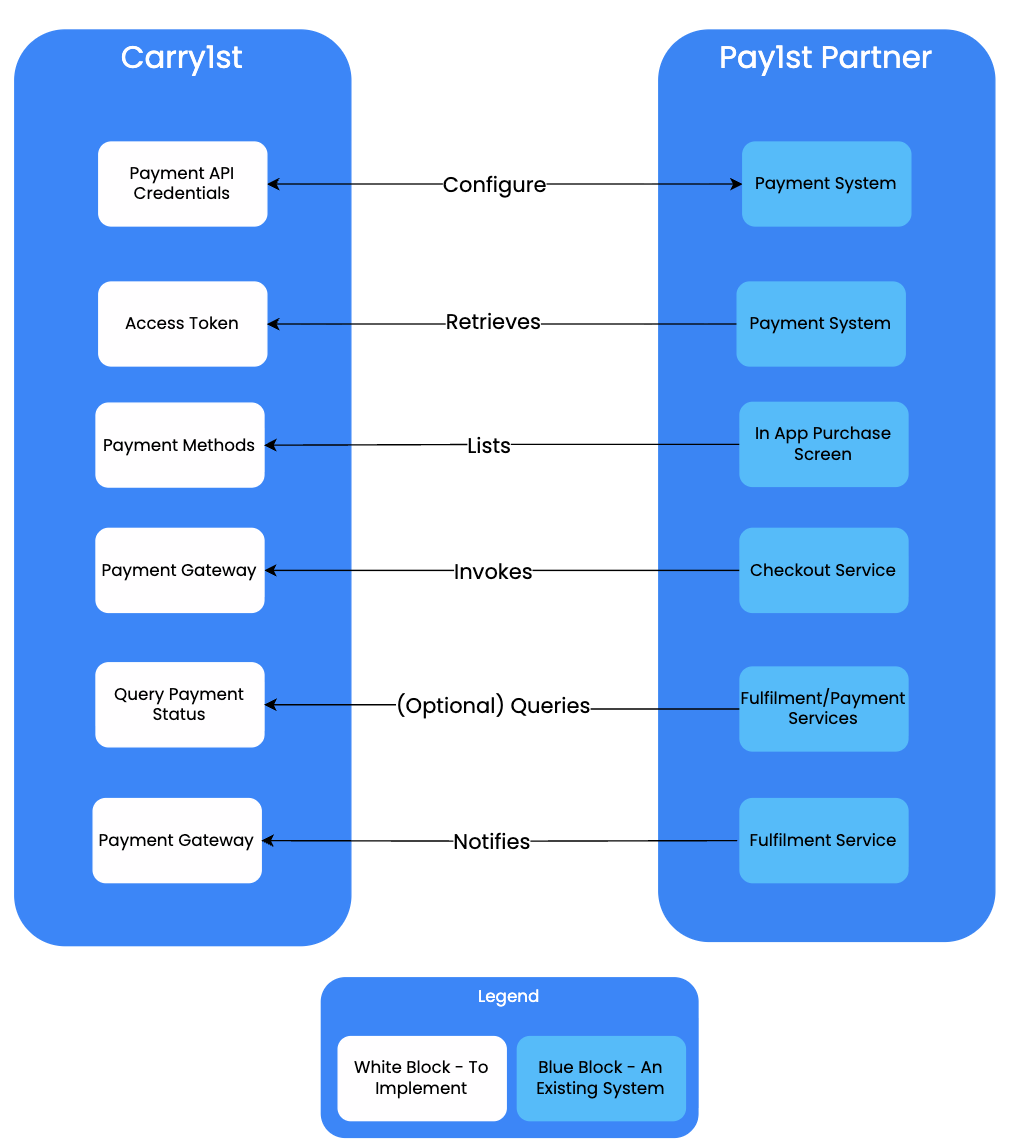
Gateway Integration High Level Overview
Pre Requisites
These are the pre-requisites that are needed from the Pay1st Partner
- A list of email addresses that would need to be invited to the Pay1st Admin Console
- A communication method to be set up: Slack is preferred, but alternative communication tools (WeChat, Teams, Telegram, etc.) can be used as well
Checklist
The following table is a checklist that can be used for tracking progress or for project management purposes:
Estimated Time (in days) | Task | Team Members |
|---|---|---|
| ~0.5 | All supplied email addresses will receive a welcome email from Pay1st. The steps in this email need to be completed to complete registration | Pay1st Partner |
| ~0.5 | The Pay1st Partner will generate their API Credentials to use for the integration. Additionally, payment methods will need to be associated in this step. | Pay1st Partner |
| ~1 | If payment method selection is required, then the List Payment Methods API needs to be integrated | Pay1st Partner |
| ~2 | Implement the Authentication - Generate Access Token API | Pay1st Partner’s Development Team |
| ~2 | Implement the Create Payment Request API. | Pay1st Partner’s Development Team |
| ~1 | Configure and implement Webhooks and Callbacks in order for Pay1st to redirect back to the Pay1st Partner’s Platform correctly. | Pay1st Partner’s Development Team |
| ~0.5 | Redirect to the Pay1st Gateway by Building Pay1st Checkout Links. | Pay1st Partner’s Development Team |
| ~1 | Notify the Pay1st Gateway on fulfilment completion by Fulfilment Completion Webhooks | Pay1st Partner’s Development Team |
| ~1 | Do a full end to end test Payment in theSandbox/Staging Environment. | Pay1st Partner and Pay1st Implementation Manager |
| ~1 | Replicate the staging configuration for production. | Pay1st Partner |
| ~0.5 | Do a UAT production test using this configuration. | Pay1st Partner or Pay1st Implementation Manager |
| Total: ~11 | Go Live! |